Explore Product Category
Explore Products
Free AI Chatbots
AI SEO Tools
AI Browsers
AI Real-Time Speech Translators
AI Video Translators
AI Vibe Coding Tools
AI Content Generator Tools
Product Reviews
Kling AI Review
Autodraft AI Review
Gamma AI Review
Poe AI Review
ReelCraft Review
Remaker AI Review
Pippit AI Review
Explore Products
Apps Like Afterpay
Buy Now Pay Later Apps in India
Apps Like Deferit
Payment Apps in India
Apps Like Sezzle
Payment Gateways in the USA
Apps Like Empower
Product Reviews
myBillBook Review
EveryDollar App Review
Helcim Review
TurboTenant Review
Chime App Review
YNAB App Review
Innago Review
Explore Products
Posture Apps
Tai Chi Apps
Blood Pressure Apps for Android
Calisthenics Apps
Free Running Apps
Chair Yoga Apps
Yoga Apps
Gym Workout Apps
Product Reviews
MyFitnessPal Review
Calm App Review
Hims App Review
Yoga Go App Review
HealthifyMe App Review
Jane App Review
Lose It App Review
Explore Products
Android Antivirus Apps
Cybersecurity Tools
Cloud Storage Services
Malware Removal and Protection Software
Data Management Software
Product Reviews
AppLock Review
FileTransfer io Review
Codify Review
Transmore Review
Explore Products
Social Media Apps
Social Media Management Tools
Community Apps
Job Search Sites
AI Social Media Post Generators
Free Dating Apps
Product Reviews
BeReal Review
Bumble Review
Discord Review
Arattai Review
DateMyAge App Review
Explore Products
Food Delivery Apps in USA
Shopping Apps for Women
Grocery Shopping Apps
Shopping Apps
Ecommerce Apps
Dropshipping Websites
Product Reviews
Temu Review
SHEIN Review
ASOS Review
YesStyle Review
Wish Review
Explore Products
Proximity Marketing Apps
Shopify SEO Tools
SEO Tools
Email Marketing Platforms
Marketing Apps for Small Businesses
Digital Marketing Tools
Product Reviews
Inflact Review
Pushwoosh Review
Pushwoosh Review
Explore Products
Apps for Small Business
Video Conferencing Apps
Investment Apps
Fundraising Apps
Digital Signature Apps
Human Resource Software
Product Reviews
Newton Mail Review
Invoice Home Review
Slack Review
Hourly App Review
Anaplan Review
MobileHR App Review
Explore Products
Action Gaming Apps
Mobile Games
Zombie Mobile Games
Most Popular Games
Mobile Anime Games
Survival Games
Product Reviews
PUBG Mobile
Free Fire
Cool Math Games
Adventures of Mana
World War Heroes
Temple Run 2
Blogs
Grok vs. ChatGPT: I Ran 4 Real-World Experiments to Find the Better AI
Git Rebase vs. Git Merge | Differences, Use Cases, and Team Conventions
Best Desk Booking Software for 2026: Tested on Mobile, Not Just Spec Sheets
Perplexity vs. ChatGPT: I Pay for Both, and For Completely Different Reasons
Winning SEO for Ecommerce Product Pages
How Much Do PPC Services Cost? A Detailed Breakdown for 2026
Paid Search Intelligence: How Smart PPC Teams Stop Burning Budget in 2026
AI Agents in Mobile Apps: What’s Shipping and What’s Next?
Other Blog Categories
Remaker AI is an all-in-one AI editor offering video generation, meme creation, and image upscaling tools. Here’s my Remaker AI review, where I tested its image upscaler for speed, quality, and real-world performance.
Table Of Contents
For us, Product Reviews mean diving headfirst into the functionality of each digital product, whether it's an app, software, or website. Our process centers around hands-on testing of each tool we pick. From scrutinizing features to testing vulnerabilities of security standards, the goal remains to help you find products that don't just work but truly elevate your experience. In a nutshell, if we're recommending a product, it's because we believe it'll genuinely make your digital life easier.
Written By Riya
Riya turns everyday tech into effortless choices! With a knack for breaking down the trends and tips, she brings clarity and confidence to your downloading decisions. Her experience with ShopClues, Great Learning, and IndustryBuying adds depth to her product reviews, making them both trustworthy and refreshingly practical. From social media hacks and lifestyle upgrades to productivity boosts, digital marketing insights, AI trends, and more—Riya’s here to help you stay a step ahead. Always real, always relatable!
I was one minute away from deleting yet another terrible photo when Remaker AI did something amazing; it turned it into the kind of image I would’ve happily posted, printed, and even framed. And it took less than five seconds.
This wasn’t just another ‘AI editor with filters’, it was a genuinely impressive leap in what editing tools can do. Sudden sharpness, clean backgrounds, noise gone, and more. Details I didn’t even know existed.
So I stress-tested it with blurry shots, old vacation pics, and random selfies. Even images I’d already given up on. And the results? Honestly… surprising.
Here’s the real breakdown, an honest Remaker AI review. We’ll explore where this tool stumbles, and whether it is worth sticking with.
Pros
Cons
This is one of the best AI image editors that provides a powerful yet accessible platform for digital content creation. Here are the standout features of Remaker AI that can empower you to produce professional-quality visual assets effortlessly and efficiently-
Remaker AI runs on generative algorithms that deeply analyze visual data to understand context, lighting, and texture. This ensures that every output, whether a face swap or an image enhancement, looks hyper-realistic rather than artificial.
The platform is built with enterprise-grade security protocols to strictly safeguard user uploads and personal information. It operates on a confidential processing system where images are used solely for the requested task and are not exposed to public databases or third parties.
Remaker AI utilizes a robust cloud infrastructure that undergoes rigorous quality control and stress testing to prevent crashes or downtime. This ensures that the tool functions smoothly even during high-traffic periods or when processing large 4K video files.
All complex computing tasks are handled on Remaker’s powerful remote servers rather than your local device. This means the platform works fast and efficiently without draining your computer’s battery or requiring a high-end graphics card.
The platform is designed with a ‘zero-learning-curve’ philosophy, featuring simple drag-and-drop functionality and clear navigation. The interface guides you step-by-step through complex processes like video editing or AI generation.
Unlike many platforms that force monthly subscriptions, Remaker offers a credit-based model with permanent validity. You purchase credits once, and they remain in the account indefinitely until they are used.
Also Read: Best Apps to Edit Your Instagram Photos
Remaker AI offers a comprehensive suite of AI-powered tools. From background removal to generating AI talking photos, these tools are suited for a wide range of tasks.
Remaker AI works on a one-time payment model. The tool offers credits for different AI tools; there is no monthly subscription included. Here is an overview of the pricing-
*Please note that the Batch Watermark Remover and the Batch Image Upscaler are only available if you are a VIP member.
Bonus Read: Best Photo Editors
Rate the product based on your experience?
How was your experience with the product?
Also Reviewed By Us
Amazon
Canva
Figma
Libera
OnlyDoc
Epidemic Sound
FEATURES
A powerful suite of generative tools, including Face Swap, Upscaler, and Video Enhancer, that simplifies complex edits into single clicks.
PRICING
Excellent credit-based model with no monthly fees and non-expiring credits, offering great value for casual and professional users.
PERFORMANCE
Fast cloud-based processing that delivers high-quality results, though video upscaling can occasionally smooth out too much texture.
UI/UX
Incredibly user-friendly interface with simple drag-and-drop functionality, making it accessible even for those with zero editing skills.
As it is already established, Remaker AI offers a suite of tools that are highly efficient in editing images. But? To test its true power, I decided to use its AI image upscaler. Here is how I used it and how you can use it too-
1. Open the Remaker AI tool on your browser and choose the image upscaler tool.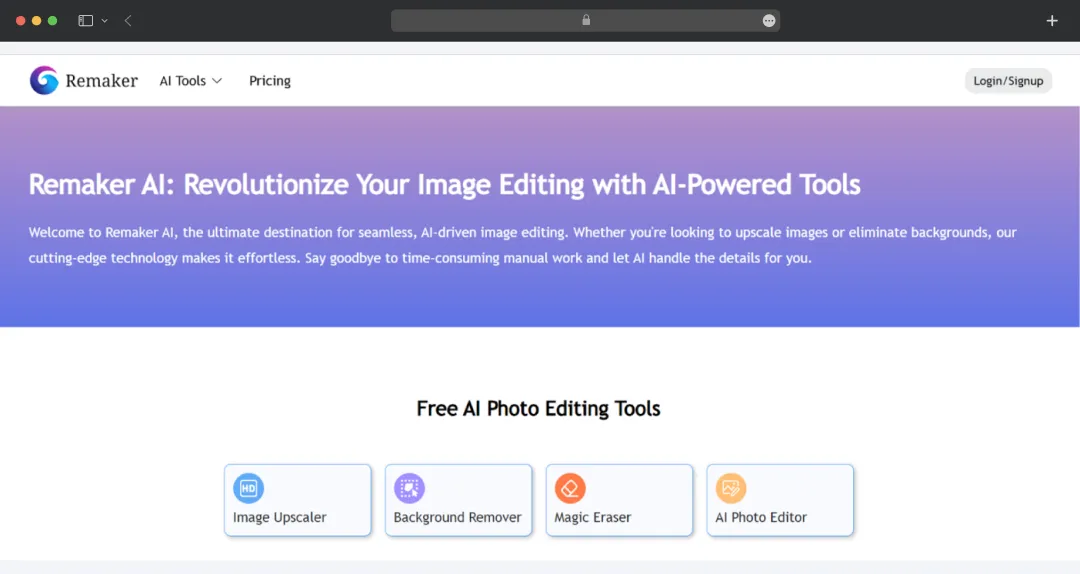
2. The tool offers you four different options- Upscaler, Unblur, Enhancer, and Face Restore.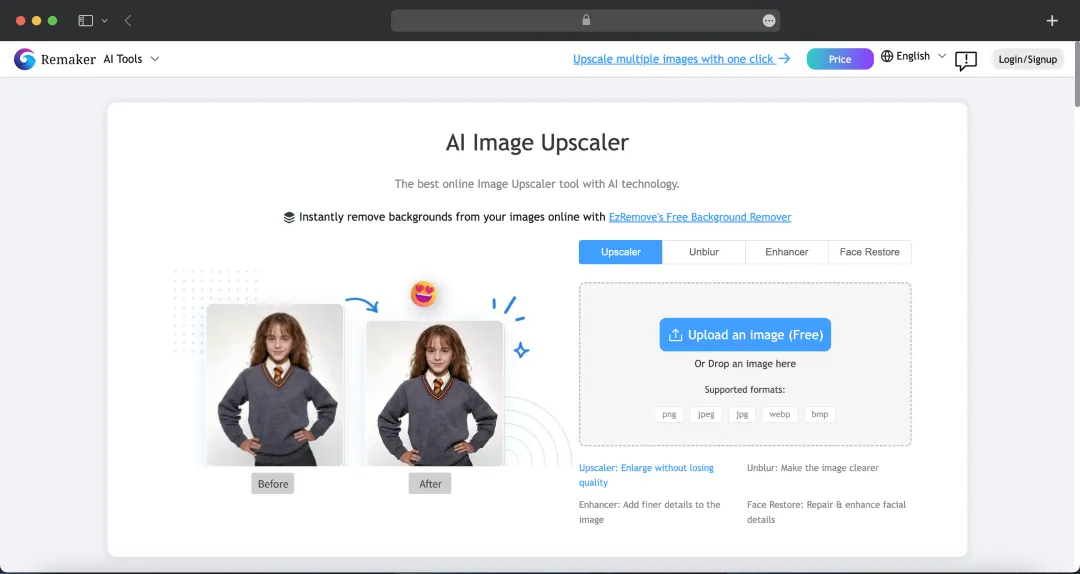
3. The next step is to upload the image you wish to upscale. You can either upload the image from saved files or simply drag and drop.
Please note: Although I’ve personally tried the tool to give you authentic insights, the images used here are not mine but samples chosen to illustrate what the tool can do best!
Image that I uploaded to Upscale:
Here are the results:
My Verdict: The AI Image Upscaler impressively enhanced the resolution without destroying the artistic 'mood' of the photo. It intelligently sharpened facial features while keeping the background blur smooth and noise-free, though some fine textures like hair took on a slightly 'painted' look.
I was impressed by the tool and decided to share it with my team to get their opinion, and they were impressed too. Based on the Remaker AI reviews collected from my team, this tool offers a genuine productivity hack, bridging the gap between complex editing software and instant gratification.
Our editorial and design team, who are usually skeptical of one-click magic buttons, found themselves pleasantly surprised by the sheer accuracy of the Reamker AI Face Swap and Image Upscaler and the tools.
Where most competitors produce plastic-looking results, Remaker managed to retain an impressive amount of natural texture and lighting consistency. It effectively solves the time vs. quality dilemma, allowing creators to salvage low-res assets or create professional headshots in seconds rather than hours.
The standout winner for us, however, is the flexible credit-based model. In an industry fatigued by monthly subscriptions, the ability to buy credits that never expire is a massive advantage for freelancers and small businesses who may not need to edit every single day.
While it isn't without minor flaws, heavy video upscaling can sometimes look a bit over-smoothed. We would love to see a dedicated mobile app in the future, the value proposition is undeniable.
If you are a content creator, marketer, or business owner looking for studio-quality visuals without the steep learning curve of Photoshop, Remaker AI is a must-try. It earns the MobileAppDaily seal of approval for delivering powerful, accessible, and wallet-friendly AI solutions.
Share your product details and our team will get back with the next steps.
What is Remaker AI used for?
Our reviewers primarily use Remaker AI in the following areas:
Yes, Remaker AI offers a free trial that typically includes 30 free credits upon signing up. However, free users may face limitations such as watermarked downloads, lower resolution outputs (often capped at 720p), and restricted access to premium features like batch processing or 4K video upscaling.
The platform prioritizes user privacy by using enterprise-grade security protocols. Images uploaded for processing are stored temporarily and are automatically deleted from their servers after 48 hours (or 24 hours, depending on the specific tool). They do not sell your photos or use them to train public AI models without your consent.
Remaker AI is an online AI tool that helps you edit and transform images or videos, including face swaps, background changes, and quick visual enhancements. It’s designed to be fast, beginner-friendly, and ideal for both personal and creative projects.
No, one of Remaker AI's biggest advantages is that purchased credits are valid permanently and do not expire. Unlike subscription-based tools, where you lose unused credits at the end of the month, you can buy a credit pack today and use it months or even years later.
To use Remaker face AI, upload your source image and target image, select the face swap option, and let the tool process the swap automatically. It delivers the final image in seconds with minimal manual work. You can use the Remaker AI swap face feature for free with credit limits.
Latest Products
Delve into our comprehensive yet easy-to-consume guides, which provide insights that help scale business faster and prevent unseen pitfalls.
Related Products
Cut through the clutter and explore related digital products that deliver on performance.
MobileAppDaily is a B2B technology discovery platform helping businesses evaluate service providers, products, and solutions with confidence. Through structured directories, editorial insights, and verified reviews, we support informed decision-making across apps, software, and emerging technologies.
Newsletter updates,
tailored for you.
Discover
MobileAppDaily
For Business
Browse Top Agencies
Trending Products
Copyright © 2026 MobileAppDaily All Rights Reserved
Leave a Reply